Plan how to keep people safe during an emergency in our spaces
The Building Emergency Action Plan (BEAP) is designed to assist building occupants with emergency planning and response efforts.
BEAP Video
To stay current on BEAP strategies for our buildings, watch this 10 minute video.

Helpful Tips
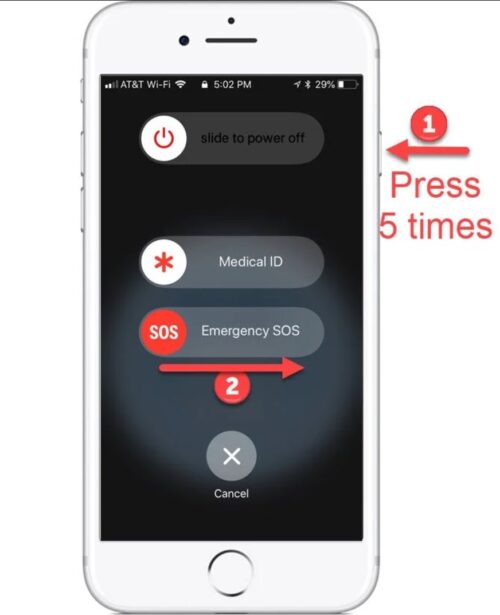
Did you know that you can quickly call 911 by pressing the lock button on your mobile phone 5 times? This works on all phones, but here are some additional details for common phone brands.
Android
Press the side button five times quickly. You can also:
- Touch and hold inside the red circle for three seconds
- Wait for the automatic countdown to start the call
- Say “Hey Google, call 911” if your phone is set to listen
- Swipe down from the top of the screen with two fingers to activate Emergency Mode
iPhone
Press the side button five times quickly. You can also:
- Press and hold the side button and either volume button for a few seconds
- Share your Medical ID to send your medical information to emergency services
- Say “Hey Siri, call 911” if your phone is set to listen
- Text 911 in some areas
Samsung
Press the side button five times quickly. You can change whether the phone dials 911 immediately or uses a countdown in the settings.
Google Pixel
Press the side button five times, then touch and hold the screen for three seconds. You can change whether the phone dials 911 immediately or uses a countdown in the settings.
School of Music Buildings
The following building floor plans include icons noting locations of Exits (outside doors on ground floors, stairs up from the basement, and stairs down from upper floors), Storm Refuge Areas, Areas of Rescue Assistance (in buildings that have them), and Evacuation Assembly Areas outside of the buildings.
If you’d like to identify as a person with access and functional needs and be added to the BEAP to receive reasonable assistance during an emergency, please email Facilities and Operations Coordinator Miranda C. Molina at mcmolin2@illinois.edu.